
Digital Accessibility
YuJa Panorama is an digital accessibility tool that is integrated in our Brightspace environment. It is designed to help instructors evaluate and improve the accessibility of their course materials and help students by increasing their accessibility to their course information and content.
Panorama identifies issues and proposes solutions to fix issues for the following formats:
- PDF (Acrobat).
- DOC and DOCX (Word).
- PPT and PPTX (PowerPoint).
- ODP (OpenDocument presentation).
- RTF (Rich Text).
- HTML (web pages).
- GIF (animated images).
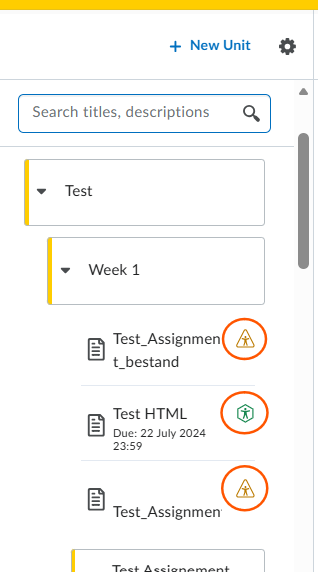
Below is a screenshot of the instructor experience in a course under the Content page. By referencing the color-coded accessibility badges next to each file, you can quickly see the accessibility score per file.
- Blue octagon: Perfect accessibility score of 100 percent.
- Green hexagon: High accessibility score between 70 and 99 percent.
- Yellow triangle: Mediocre accessibility score between 30 and 70 percent.
- Red pentagon: Low accessibility score between 1 and 30 percent.
- Dark red squiggly octagon: Accessibility score of 0 percent, commonly seen with auto-failing errors such as scanned PDFs.
- Blue circle: Alternative formats are available for students.
- Gray struck-out circle: Alternative formats are disabled for students.
Panorama main features are:
- Accessibility reports
- Course reports
- Alternative formats
- Accessibility widget
You can check the student view of the accessibility options at: Alternative formats – Student