
Course visibility
A course is by default visible to students in their course overview if they are enrolled in the course. The course and course content open on the start date of the course. This start date is set to 2 weeks before the start of the period and is visible to students. All published content is visible to students from that date. You can optionally close a course for students by adding an end date.
To prevent students from seeing the course content before you are finished editing the course, there are two ways to manually adjust the visibility of the course.
- Option 1: make content visible or hidden
- Option 2: set a different start date for your course
- Optional: set an end date for your course
Manually (de)activating a course can only be done by a key user or administrator.
Option 1: make content visible or hidden
One way to adjust visibility is to make various items invisible in the course.
- Click ‘Content’ in the navigation bar of the course.

- Click on the unit that needs to be made visible or hidden. You can check if the correct unit is invisible by seeing if the blue circle is around the correct unit. In this example, the unit called ‘Unit’ is being edited. By moving the slider next to the eye, the content can be made visible or invisible.
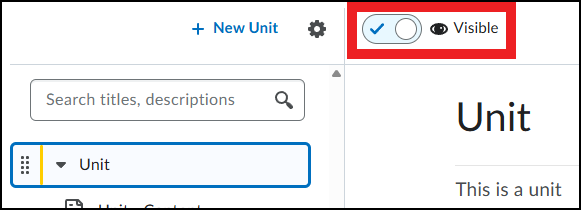
Each unit and the content underneath it can be made visible or hidden. This allows students to access the course but not see the content.
Announcements cannot be made invisible. However, you can give Announcements a Start date .
Option 2: set a course start date
By setting a ‘start date’ for a course, the visibility can be changed.
- Click ‘Course Admin’ in the navigation bar.
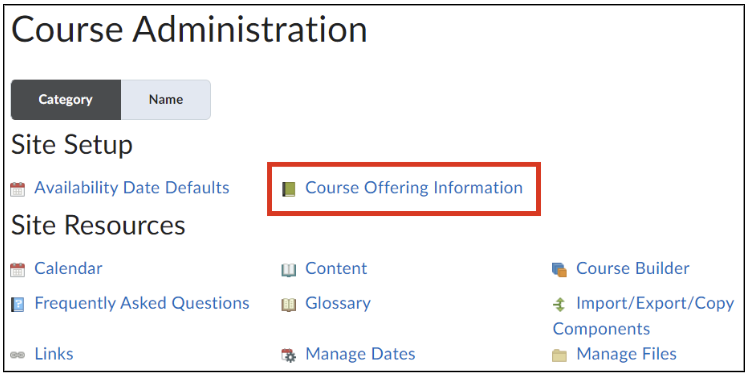

- Scroll down to ‘Start Date’ and ‘End Date’.
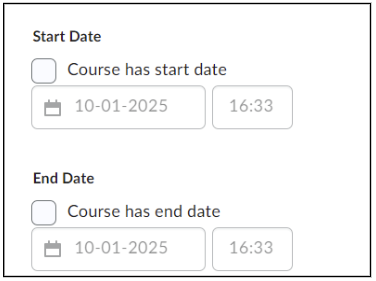
- Add a start date (and/or end date) to the course;
- Check the ‘Course has a start date’ box and fill in a specific date and time for when the course should be accessible to students.
Students will see the course before the start date on their homepage and in their course list, the start date will be visible on the course banner. Students will only gain access to the course on the specified date.