
Digital Accessibility
YuJa Panorama is a digital accessibility tool integrated into our Brightspace environment. It is designed to help instructors evaluate and improve the accessibility of their course materials and to help students by increasing their access to course information and content.
Panorama identifies issues and suggests solutions to fix problems for the following file formats:
- PDF (Acrobat).
- DOC and DOCX (Word).
- PPT and PPTX (PowerPoint).
- ODP (OpenDocument presentation).
- RTF (Rich Text).
- HTML (web pages).
- GIF (animated images).
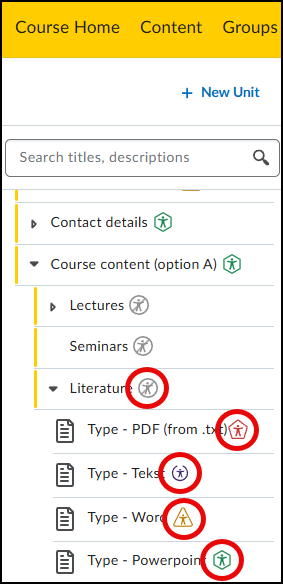
Below is a screenshot of the instructor experience in a course under the Content page. By referring to the color-coded accessibility badges next to each file, you can quickly see the accessibility score per file.

Green hexagon
High accessibility score of more than 70 percent.

Yellow triangle
Average accessibility score between 30 and 70 percent

Red pentagon
Low accessibility score of less than 30 percent.

Blue circle
Alternative formats are available for students

Grey crossed-out circle
Alternative formats are disabled for students

Purple circle
Document is being processed, score not yet known
Example of the instructor experience in a course under the Content page
The main features of Panorama are:
- Accessibility reports
- Course reports
- Alternative formats
- Accessibility widget
You can view the student perspective of the accessibility options via: Alternative formats – Student