
Recover data
In some cases, it is possible to restore deleted data from your course. This article explains which data you can restore by yourself, and which data needs assistance of D2L (the Brightspace supplier) to be restored.
In this article, the following is discussed:
- Which data parts can I restore in Brightspace?
- Which data can be restored by D2L?
- Guidelines for the Support Requests
Which data can be restored by me?
It is only possible to restore data that was deleted by yourself. The following Brightspace data can be restored regardless of when it was deleted:
- Content
- Discussions
- Assignments
- Assignment Submission
- Grade Items
- Announcements
- Quiz attempts
Content
When you delete something within the Content of the course, Brightspace gives two options: removing the data from the Content or permanently deleting the data from the whole course.
Discussions
You cannot restore topic posts by yourself. You will need to submit a Support Request (via the KeyUser of the faculty).
- Go to ‘Discussions’ via ‘Activities’.

2. Under ‘Discussions List’ click on ‘More Actions’ and then ‘Restore’.
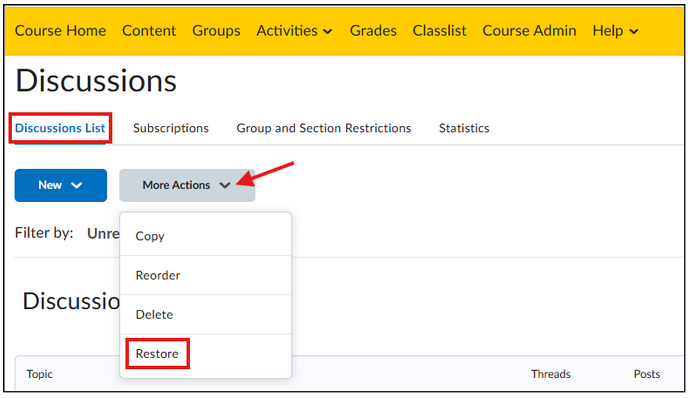
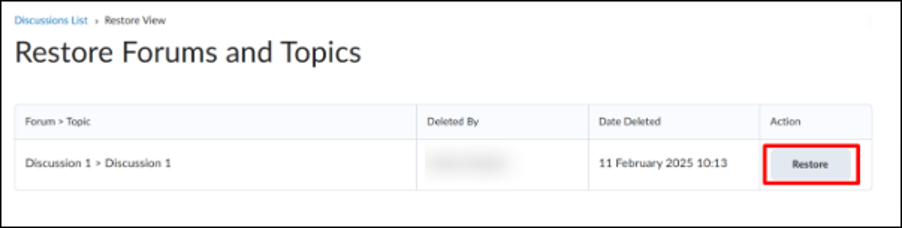
3. You now will see a list with deleted forums. Click on ‘Restore’ next to the forum you would like to recover.
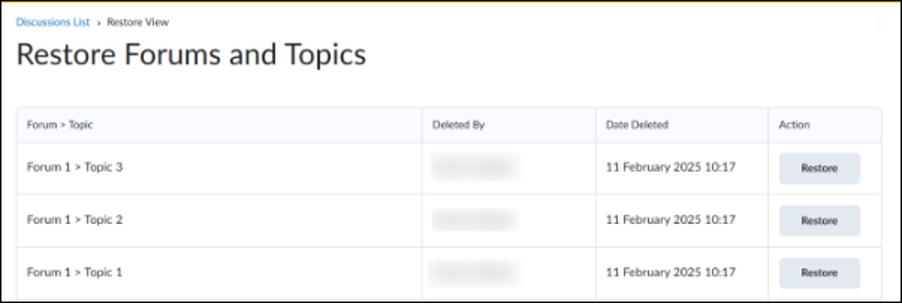
Whenever you restore a forum that has more than one topic, you can choose which topics you would like to restore.
Assignments
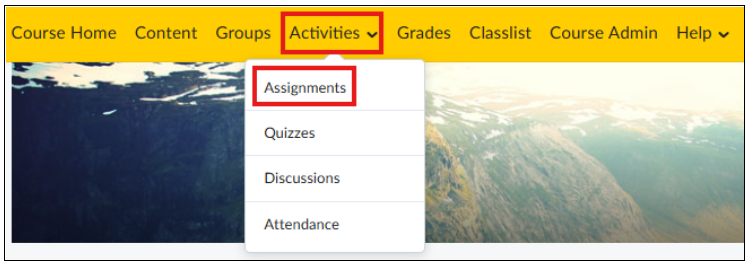
- Go to ‘Assignments’ via ‘Assignments’.
2. Click on ‘More Actions’ and then on ‘Event Log’.
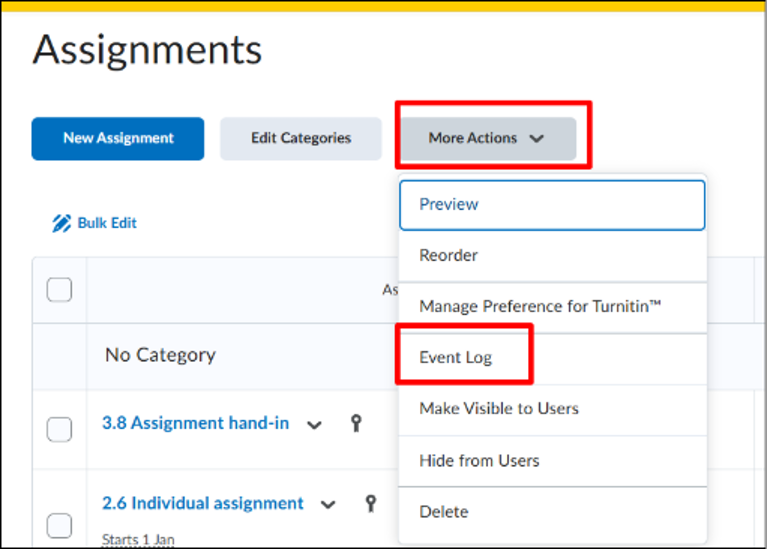
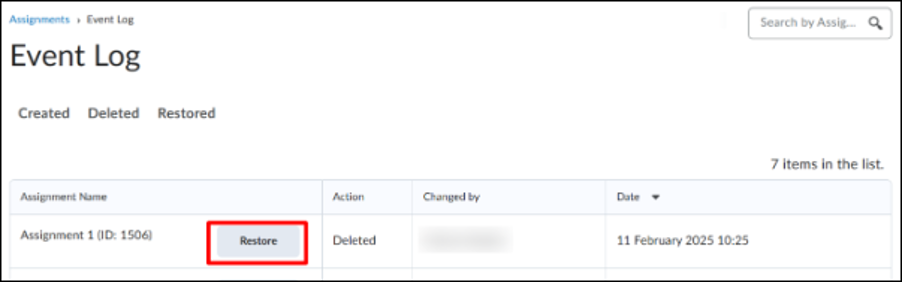
3. Click on ‘Restore’ next to the assignment you would like to restore.
Assignment Submission
- Go to ‘Assignments’ via ‘Activities’.
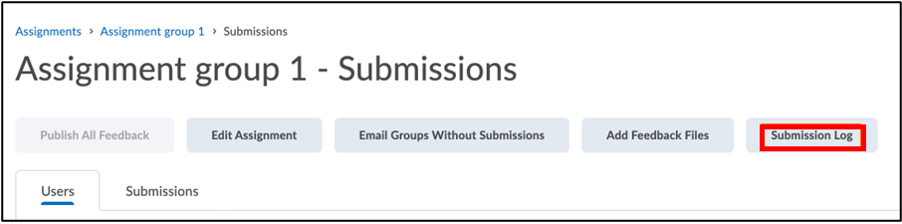
2. Go to the Assignment where you have deleted a submission. Students cannot delete their own submission. Click on ‘Submission Log’.
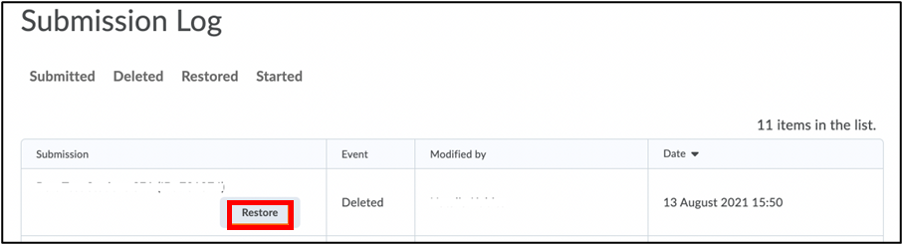
3. Click on ‘Restore’ next to the submission you would like to restore.
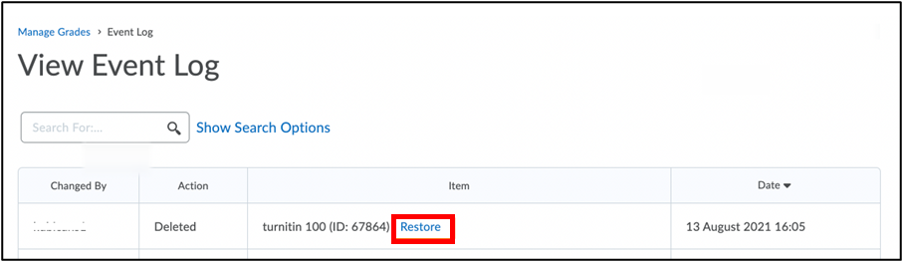
Grade Items
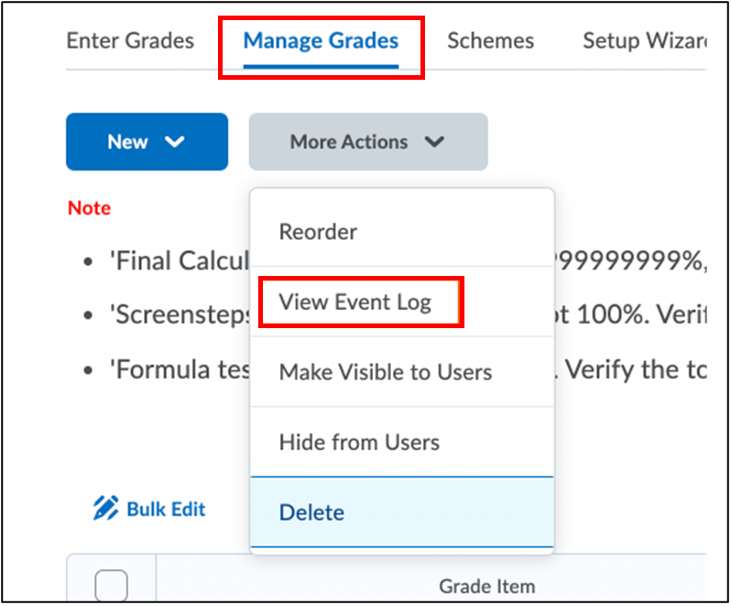
You cannot restore ‘Formula’ or ‘Calculated grade’ items.
- Go to ‘Grades’ in the navigation bar.

2. Click on ‘Manage Grades’. Click on ‘More Actions’ and then on ‘View Event Log’.
3. Click on ‘Restore’ next to the grade item you would like to restore.
Announcements
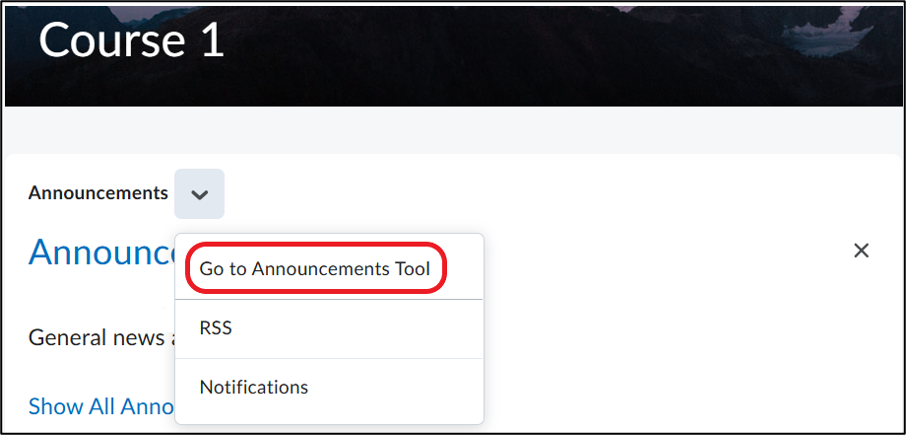
- Go to the home page of your course.
- Click on the arrow next to ‘Announcements’.
- Click on ‘Go to Announcements Tool’.
4. Click on ‘More Actions’ and then on ‘Restore’.
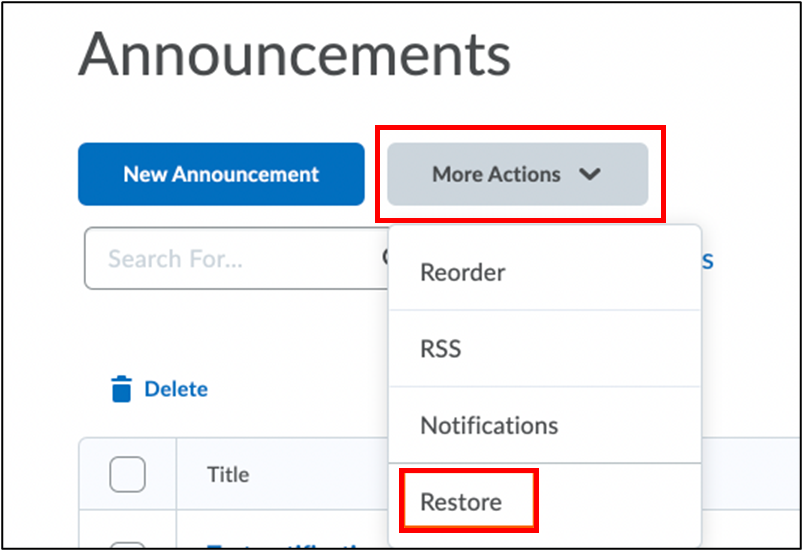
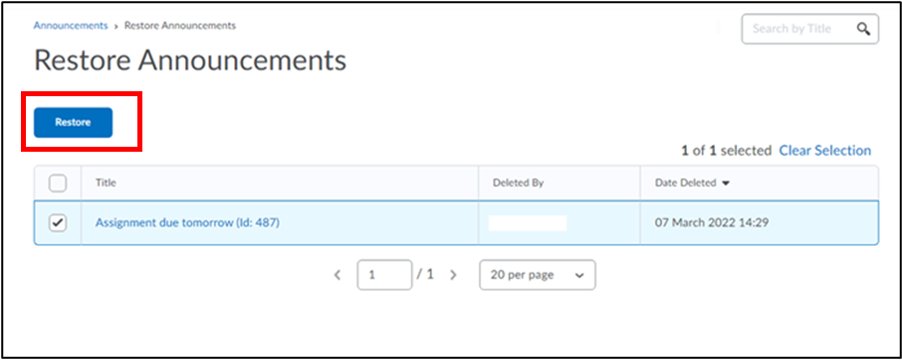
5. Select the announcement(s) you would like to restore. Click on ‘Restore’
Quiz attempts
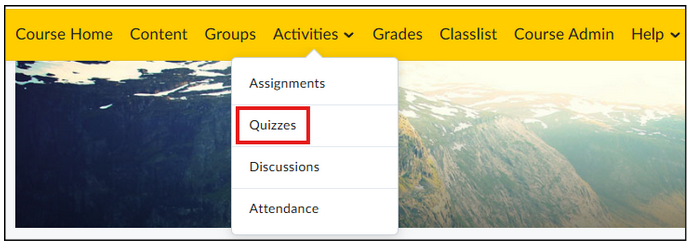
- Go to ‘Quizzes’ via ‘Activities’.
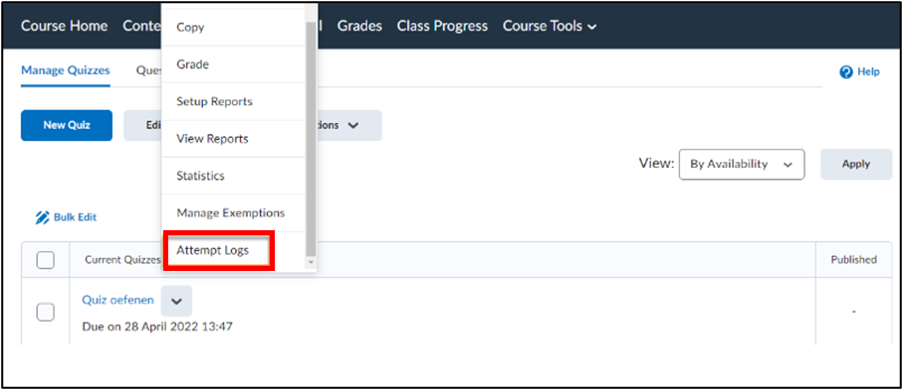
2. Click on the arrow next to the quiz you have deleted an attempt from. Click on ‘Attempt Logs’ (You might have to scroll in the menu to see this).
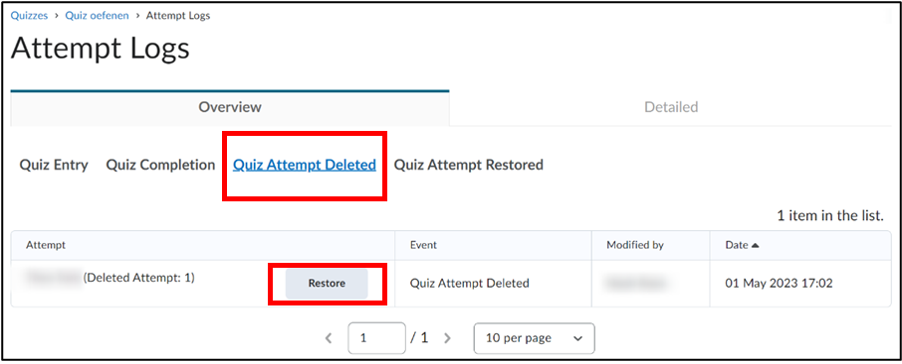
3. Click on ‘Quiz Attempt Deleted’ to see all the deleted quiz attempts. Click on ‘Restore’.
Which data can be restored by D2L?
Sometimes, deleted data can only be restored by D2L. Data from most Tools within Brightspace can be restored by yourself as Brightspace user and/or teacher. Within the Content, there is the option to permanently delete data. When you do this on accident, it may be an option to apply for a Support Request to restore the data. The Keyusers of the faculty you are affiliated with as a lecturer, who are responsible, cannot guarantee that all requests will be approved, as D2L will not take on every request. When you send a request, the Brightspace Admins will take into account the impact of the lost data.
Take into account that D2L can only restore data that has been deleted in the past 30 days.
| Object type | Required information |
| Assignments – Overwritten Submissions | Course code, assignment name, username of the student and the submission date. Note: You can only restore submissions by request that are overwritten by the setting “Only the most recent submission is kept”. |
| Content Modules | Course code and name of module Note: You can only restore deleted modules. It is not possible to go back to a certain state. |
| Content (Manage) Files | Name of the file and the date of when the file existed. |
| E-mails | Name of the folder and the username. |
| External Learning Tools | Name of the External Learning Tool and the date of when this tool existed. |
| Groups | Course code, the name of the Group and the date of when the Group existed. |
| Quizzes/Self Assessments/Surveys* | Course code, name of the object and whether there were user attempts |
| Quiz Questions | Course code, name of the Quiz and details about the questions. |
| Rubrics | Course code, name of the Rubric and the date of when the Rubrics existed. Note: Rubrics that you already used cannot be deleted. |
Guidelines for the Support Requests
- The request needs to be submitted as soon as possible. Data can only be restored if it has been deleted in the past 30 days.
- Objects are only to be restored to their ORIGINAL Org Unit (no transferring data between Org Units, for example, restore deleted content objects from one course offering to another)
- Objects are only to be restored if you are unable to do so themselves (no restoring items listed in the section above, for example, restore grades, user grades, discussion forums, etc)
- For the security of our clients and their data, full course restores cannot be performed. A list of specific components must be submitted should a full restore be needed
- When requesting Content restore please be aware that we can only restore Deleted items. Unfortunately, items cannot be reverted back to a state to a specific date/time
- Content items are restored as ‘Draft’ within the Table of Contents. The Instructor can determine what can be published
- The supplier (D2L) can only give an older backup of the Content data
- If an Object is not listed above, unfortunately, restoration is not possible at this time