
Creating a new Grade Scheme
If the desired Grading Scheme is not among the available schemes, you can create a new scheme for the course.
- Click ‘New Scheme’
The following window will open:
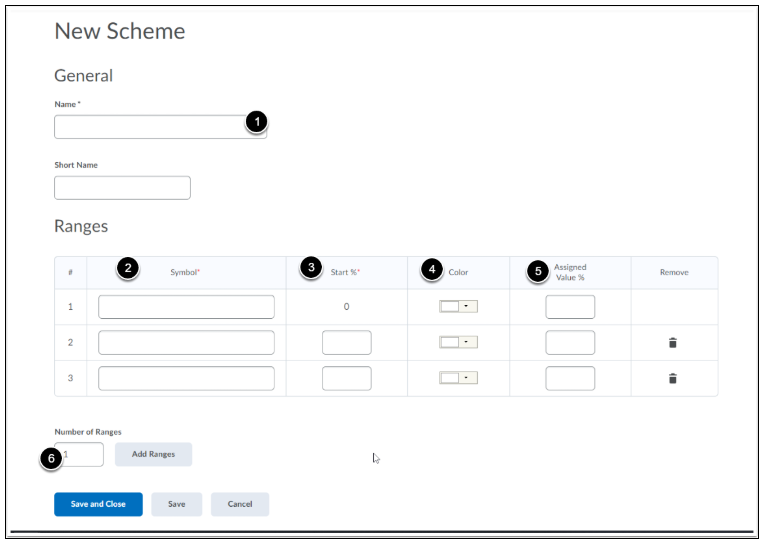
The numbers (1-6) in the image above mean the following:
- Give your grading scheme a name (for example: fail/pass/good).
- Under Symbol you can give the grade a “name” (for example: fail/pass/good or A/B/C/D).
- Under Start % you can enter which Symbols belong to which percentage ranges (for example: the symbol “pass” is assigned when the starting percentage is 60% and “good” is assigned at 80%. This means that every student with a grade between 60-79% receives a “pass”).
- Under Color you can link a color to a Symbol. This is optional, but is a useful way to organize and provide a visual indication of how students are performing (for example: fail is red, pass is yellow, and good is green).
- Assigned Value ensures that Brightspace can correctly translate labels into a numerical system, in other words assign a consistent grade to labels such as Fail, Pass, or Good. This is useful for correctly calculating the final grade. Choose logical values for this, for example the midpoint of the category:
- A: 90-100% (Assigned Value: 95)
- B: 80-89% (Assigned Value: 85)
- C: 70-79% (Assigned Value: 75) or see the example below.
NOTE: If you do not enter an Assigned Value, the starting percentage of the category will be used.
- If you need a larger input table, rows can be added using ‘Add Ranges’. Enter how many additional rows are needed (for example, if you want to enter 5 categories, you need 2 more rows in addition to the 3 that are already there by default) and click ‘Add Ranges’.
For example: 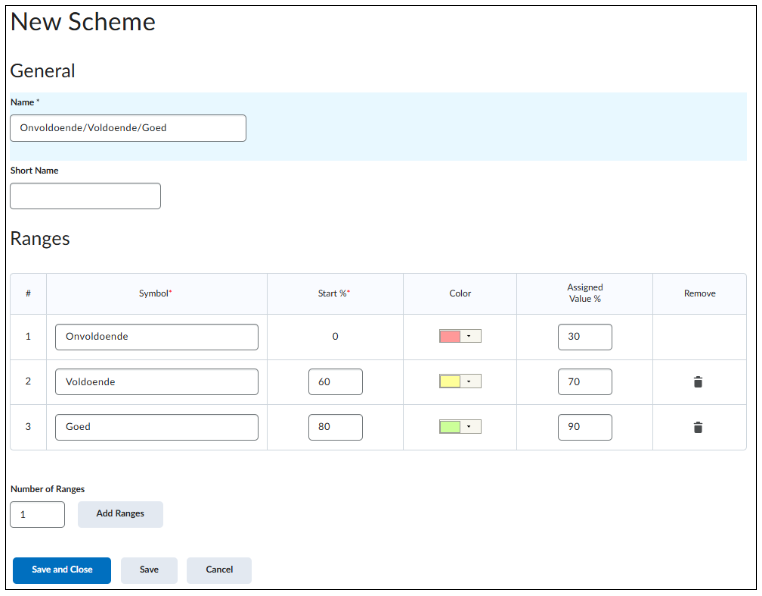
Now click ‘Save and Close’ to save the new grading scheme. Your new scheme will now appear under ‘Course Schemes’.
It is always possible to edit your saved grade schemes. Click on the name in Schemes and you will automatically be taken to the same page you used to create a new scheme, where you can now edit the grade scheme.